

 How Affiliates Can Generate Consistent Revenue with PPC Affiliate Marketing in 2026
 Credit Card and Loan Affiliate Campaigns: Strategies for Higher Conversions
 Semrush Affiliate Program: A High-Payout Offer for Marketers and SEO Publishers
 10 Best Affiliate Marketing Platforms of 2026
 Fintech Affiliate Campaigns: Monetizing Finance Traffic with High-Payout Offers
Confused About Affiliate Links? You’re Not Alone.
You’ve probably seen creators drop a “link in bio,” bloggers recommend products with a “read more here,” or Telegram channels sharing deals that just happen to convert. What connects them all? Affiliate Link– a single link that tracks clicks, credits referrals, and turns honest recommendations into real earnings. And if you’re reading this, chances are you’re wondering, How do these links actually work? Where do I get them? How do I use them right?
In this blog, we’ve answered the 20 most common (and often confusing) affiliate link questions. Let’s get started.
An affiliate link is a special URL given to you by the affiliate network (like vCommission) that tracks your referrals. When someone clicks on it and makes a purchase, you earn a commission. It contains your unique ID or tracking parameters to ensure the sale is credited to you.
Affiliate links often look long and contain parameters. Example: https://track.vcommission.com/click?c=12345&subid=yourid
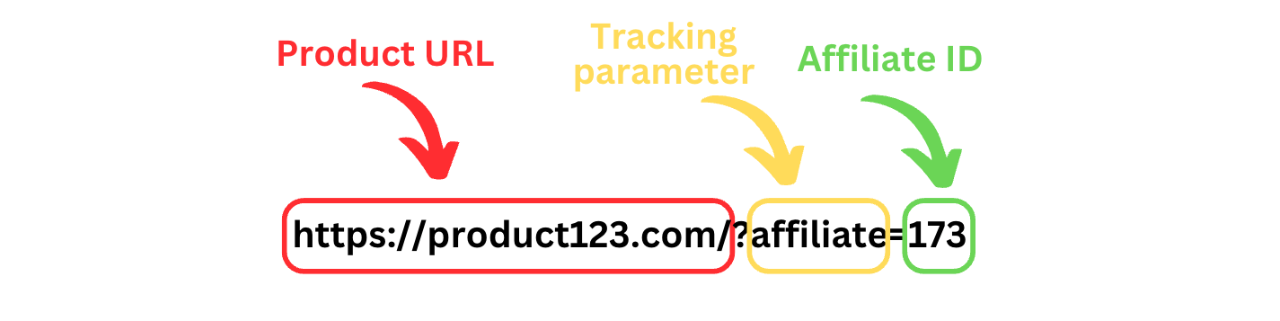
This link may redirect users to the actual brand site, but the initial URL ensures tracking. You can always shorten or cloak it for better aesthetics.
Once you’re approved as a publisher on vCommission, you can generate your affiliate links directly from the dashboard:
Make sure to only promote offers you’ve been approved for, and always use the affiliate link provided to ensure your conversions are tracked properly.
Cookie duration tells you how long a user’s click remains valid for tracking. For example, if a campaign has a 14-day cookie window and someone makes a purchase on Day 12, you still earn the commission. This varies from campaign to campaign and is mentioned clearly in the campaign brief.
You can promote affiliate links via multiple traffic sources like blogs or websites, social media (Instagram, Facebook, Twitter/X, YouTube), telegram, WhatsApp (if the campaign allows it), email newsletters, and coupon or cashback websites. Just make sure to follow each campaign’s allowed promotional methods.
No. While blogs help with SEO and long-term traffic, they’re not necessary. You can use social media apps, content-based landing pages, and even Telegram channels to promote links, depending on what you’re approved for.
Put them where they feel natural:
Always write content that makes the link feel helpful, not forced.
Some content formats just convert better, and it’s no coincidence. They solve real problems, build trust, and offer genuine value to the reader. Here are the top types to try:
These formats work across blogs, emails, and even social media. Keep it real, helpful, and relevant, and your links will perform.
You can start adding affiliate links once two things are in place. First one – you’ve been approved for an affiliate program via vCommission, and the second- you have relevant, helpful content that your audience actually wants to read.
Here’s how to get started the right way:
Step 1: Focus on valuable content first: Don’t rush to insert links. Build content that solves a real problem, ike product reviews, how-to guides, or listicles. Good content attracts traffic, and traffic drives conversions.
Step 2: Choose products that fit your niche: Think about what your audience needs. If your blog is about skincare, don’t promote fitness gear. Go for products and brands that align with your theme and offer value to your readers.
Step 3: Set up link tracking inside your affiliate dashboard: vCommission gives you the ability to track clicks, conversions, and performance through custom subIDs. Use these to track where your traffic is coming from, like blog posts, emails, or social media.
In short? Add affiliate links when your content is useful, your audience is targeted, and your tracking is ready. That’s how you set yourself up for success.
You need to focus on trust, clarity, and timing to boost your affiliate link clicks. Here’s what works well:
To properly mark an affiliate link as sponsored, add rel=”sponsored” to your anchor (<a>) tag. This helps search engines understand that the link is part of a paid partnership or affiliate program.
Here’s the correct HTML format:

If you also want to prevent search engines from passing link equity, you can include both nofollow and sponsored like this:

Using the sponsored attribute aligns with Google’s guidelines for disclosing paid links and helps maintain transparency.
Yes. Transparency builds trust. Most countries, including India, recommend that you clearly mention that some links may earn you a commission. It’s also required by platforms like Google.
Use a simple line: “Some of the links in this post are affiliate links. That means if you click and buy, I may earn a small commission at no extra cost to you.” You can place this at the top or bottom of your content.
Yes, vCommission provides real-time tracking through your dashboard. You can see how many people clicked your links, how many conversions you’ve received, and how much you’ve earned. The dashboard also offers SubID-level tracking, which helps you understand which traffic sources or content placements are performing best.
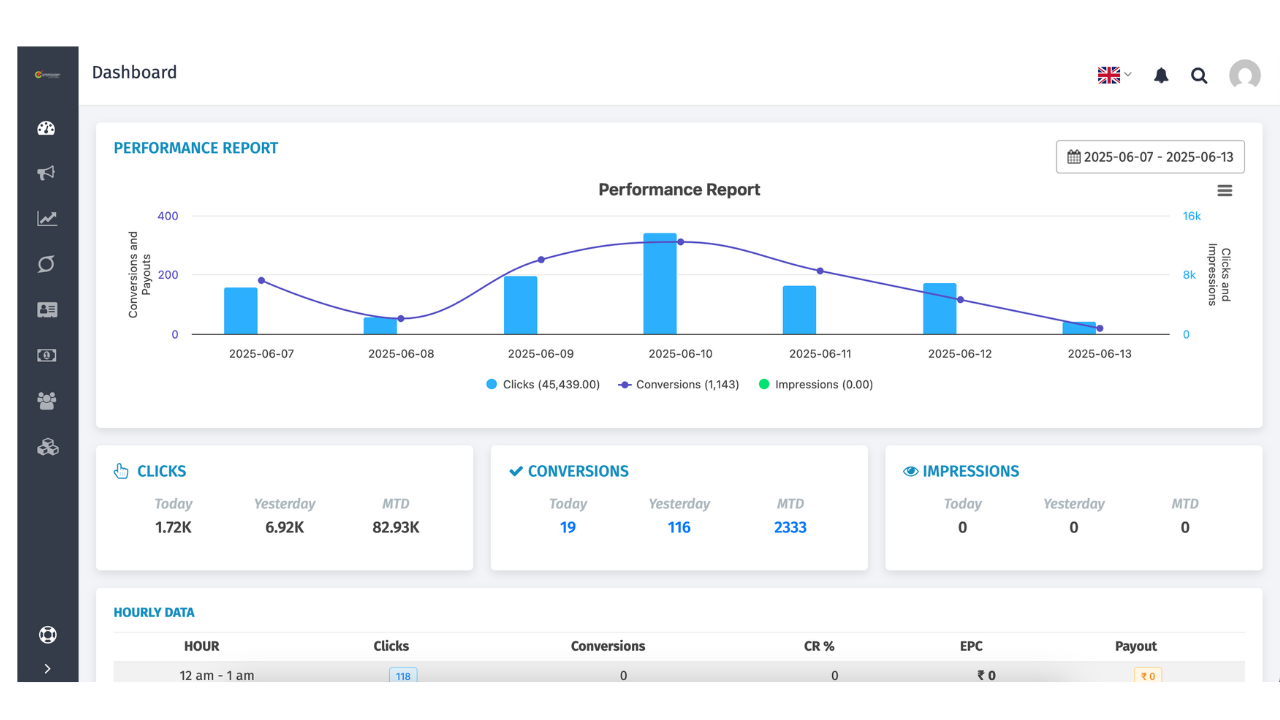
In some campaigns, you can even view additional details like device type, location, and operating system. All this data makes it easier to spot trends, test what’s working, and improve your strategy over time.
Tracking helps you understand what content performs best, where your traffic is coming from, and which campaigns are worth your effort. It also helps in testing headlines, placements, and content styles.
Yes, you can! Most vCommission campaigns allow you to use affiliate links inside popups. Just make sure to check each campaign’s rules; some brands may have their own guidelines. Pop-ups help your audience notice your affiliate links. But if they show up too early or too often, they can annoy visitors. That’s why it’s smart to use them carefully.
Smart ways to show popups:
When used the right way, popups can boost your clicks and sales without hurting the user experience.
Absolutely. You can include several links as long as they add value and don’t confuse the reader. For example, a “Top 5 Protein Powders” post might have five different affiliate links. The only rule is to be sure every affiliate link you are adding is relevant to the post’s topic.
Promoting affiliate links on social media is all about blending value with visibility. Instead of just dropping links, focus on creating content that informs, solves a problem, or inspires action.
Direct Promotions
On platforms like Instagram, X (formerly Twitter), or Facebook, you can add affiliate links in bios, captions, or swipe-up stories (where allowed). Additonally, you can share exclusive deals, discount codes, or product spotlights to draw attention. Use compelling CTAs (like “Shop now” or “Check it out”) that feel natural and not overly salesy.
YouTube & Video Content
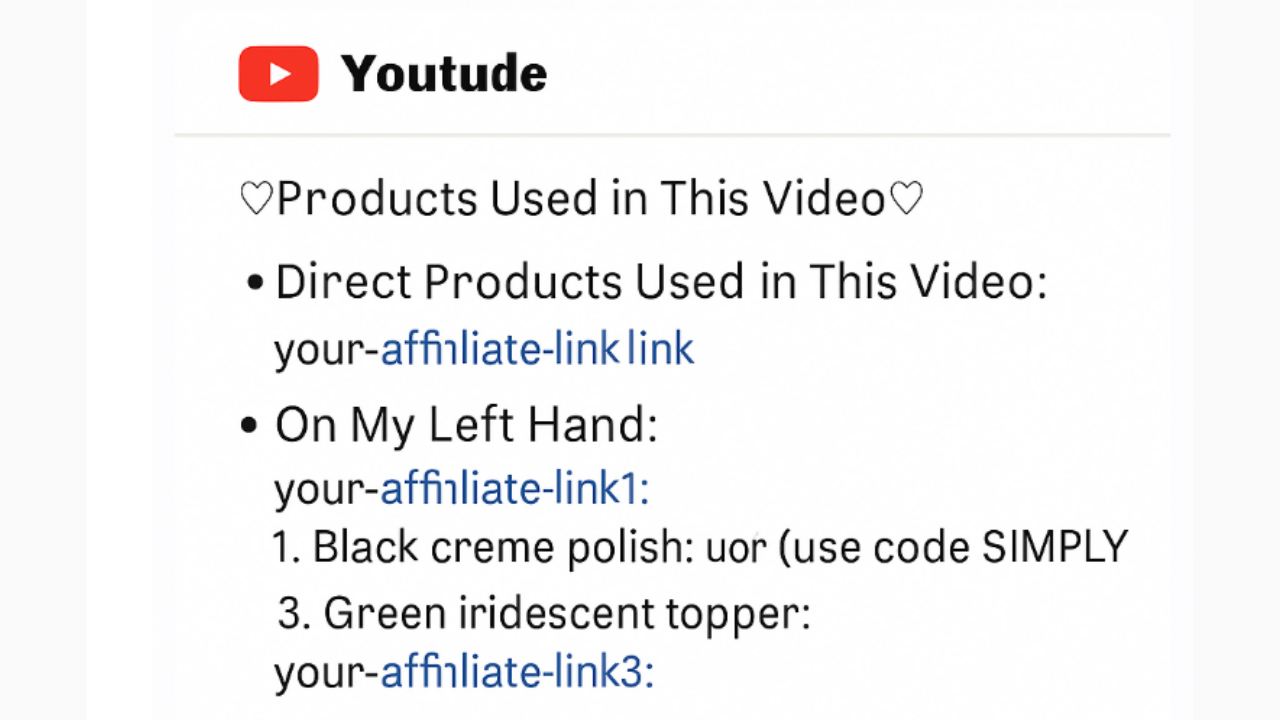
If you’re sharing video content, mention the product naturally during the video. You can add your affiliate link in the description box with a short reason to click, or pin a comment with the link for extra visibility. Most of the YouTubers do this all the time when promoting affiliate products on their videos. They even prompt their viewers to use the link to check out the product. Here is how you can do it:
Facebook Groups & Communities
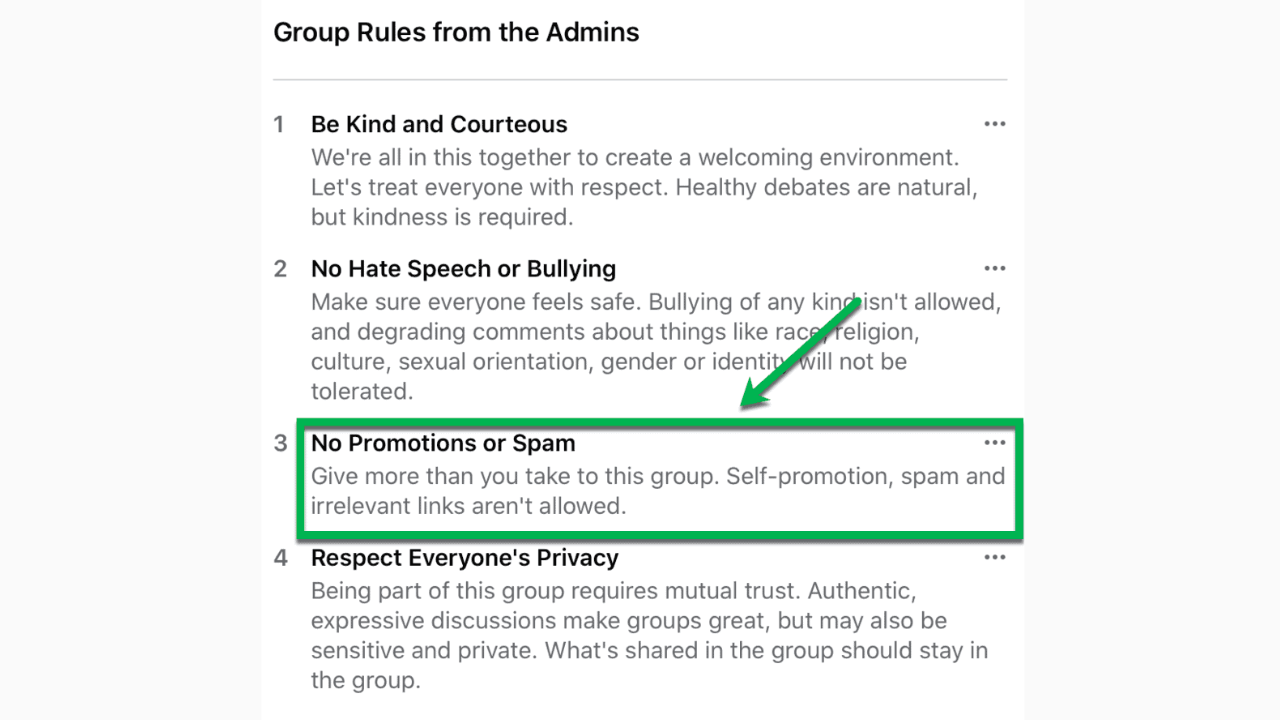
Before sharing affiliate links in groups, always check the group rules; some allow it, many don’t. A smarter approach is to share valuable blog content (like tutorials, reviews, or listicles) that includes your affiliate links, and offer genuine recommendations or feedback when someone asks for advice. Just remember that groups often have rules regarding affiliate links, such as:
The Indirect Route
You can also promote affiliate links through content like blog posts or reels that review or compare products, and quick how-to guides that incorporate the link as a helpful resource.
Ultimately, success on social media comes from building trust. When your audience feels like you’re offering something helpful, not just selling, they’re far more likely to click.
Link cloaking means turning long affiliate links into cleaner URLs like: yoursite.com/go/product. This makes links look better and can improve click rates. Cloaking also protects your affiliate ID and helps with tracking. But note: always check campaign rules before cloaking, as some brands or networks may not allow it.
Hiding your affiliate ID helps protect your commissions. If someone sees your ID in a link, they could replace it and earn credit for your referral.
It also makes links look cleaner and more trustworthy, especially on blogs or social media. Just remember, always check if the campaign allows link cloaking before doing it.
Affiliate links aren’t just about adding URLs to your content. They’re about helping your audience discover the right products at the right time. The more thoughtful you are with your placement, disclosures, and strategy, the better your results. Mastering how to use affiliate links is the first step toward long-term affiliate income.
With vCommission, you’re not alone in that journey. You get access to high-performing campaigns, accurate tracking, and expert support that helps you scale, link by link. Sign up now!