Getting started in affiliate marketing can feel like learning a new language. You’ll come across terms like EPC, eCPA, CPS, and CPL, and if you’re new, whether as an influencer, a D2C brand owner, or just exploring, it can be overwhelming.
As the industry grows, there are more terms, platforms, and rules to understand. According to Publift’s 2025 report, affiliate marketing is projected to surpass $31 billion globally by 2031. That means more platforms, more data, and more conversations are filled with short forms and jargon that everyone assumes you already know.
This blog simplifies that for you. We have listed 50 important terms you’ll keep hearing in campaigns, dashboards, and calls. Let’s get started.
Affiliate Marketing Basic Terms
If you’re in affiliate marketing, there are a few key terms you need to understand first. These basics explain how affiliate marketing works, who the main participants are, and how everything connects.
- Affiliate Marketing: Affiliate Marketing is a performance-based marketing where an affiliate promote products or services using a unique tracking link. When someone clicks the link and makes a purchase or completes a desired action, affiliate earn a commission as a reward for driving that sale or lead. To know more about affiliate marketing, read it out – Affiliate Marketing for Beginners: A Simple Guide to Getting Started as an Affiliate.
- Affiliate: An individual or company that promotes offers on behalf of brands/advertisers. Affiliates use different platforms/traffic sources like content marketing, cashback websites, media buying, or social media traffic, to send users to a brand’s page.
- Advertiser: A company or business that represents a brand and owns the product or service being promoted. Advertisers work with affiliate networks like vCommission to connect with high-quality affiliates and boost their reach, sales, and customer base.
- Publisher: A publisher is an individual or business that works directly with an affiliate network or advertisers to promote offers using their own traffic sources, such as websites, blogs, apps, social media channels, or paid ad campaigns. Publishers manage and run campaigns themselves, leveraging their platforms to drive targeted traffic and generate conversions. Unlike affiliates who may pass campaigns to sub-affiliates, publishers typically execute promotions on their own channels.
- Affiliate Network: An affiliate network like vCommission is a platform that facilitates partnerships between advertisers (brands or merchants) and affiliates (partners who promote their products or services). It acts as the middle layer, providing affiliates with access to multiple offers, tracking technology to record clicks and conversions, and real-time reporting to monitor performance. The network also manages key operations such as offer approval, compliance checks, real-time tracking, and timely payouts.
- Offer: An offer is a specific product, service, or deal listed by an advertiser for affiliates to promote. It includes key details such as commission rates, conversion requirements (e.g., sale, lead, install), and permitted traffic sources.
- Campaign: A campaign is the affiliate’s execution plan to promote an offer and drive conversions. This could involve channels like paid ads, content marketing, app notifications, or Telegram broadcasts. In affiliate marketing, “offer” and “campaign” are sometimes used interchangeably, especially in ad platforms, because both refer to the promotional opportunity provided by the advertiser. However, the offer is what the affiliate promotes, and the campaign is how the affiliate promotes it.
- Affiliate Link: A unique tracking URL provided by the affiliate network to each affiliate. It contains macros or special codes that identify the affiliate’s traffic. When a user clicks this link and completes an action, such as making a purchase or submitting a lead, the system records the details and attributes the conversion to that affiliate, ensuring accurate commission payment.
- Landing Page: The webpage users are directed to after clicking an affiliate link. A well-designed landing page helps encourage users to take the required action, such as making a purchase or signing up.
- Advertiser Dashboard: An internal panel used by advertisers to view how their campaign is performing, including clicks, conversions, traffic sources, and affiliate activity.
Affiliate Marketing Metrics and What They Mean

Once a campaign is live, performance tracking becomes the most important part of affiliate marketing. This section covers the key metrics you’ll see on affiliate dashboards, helping you understand what’s working, what’s not, and how to measure success.
- Click: A click occurs when a user actively interacts with an affiliate’s tracking link, banner, or creative used in a campaign. This action takes them to the advertiser’s landing page or app store listing. Clicks mark the starting point of the conversion journey and are recorded in real time within the affiliate network’s tracking system, ensuring that every affiliate-driven visit is accurately attributed.
- Impression: An impression is counted each time an ad, banner, or affiliate link is displayed to a potential customer on any approved platform. It does not require the user to take any action; simply loading the page or app where the creative appears is enough to register the view.
- Conversion: A completed action that the advertiser pays for, such as a purchase, lead, app install, or form submission. This action is performed by the end user, the person who clicks the affiliate’s link and then completes the required goal on the advertiser’s site or app. Once the action is completed, it is tracked through the affiliate network system so the affiliate receives proper credit for the conversion.
- Conversion Rate (CR): The percentage of people who click the affiliate link and then complete the required action. The formula for CR is (Conversions ÷ Clicks) × 100. A higher CR means your traffic is converting well.
- Click-Through Rate (CTR): The percentage of people who saw the affiliate link or ad and clicked on it. The formula of CTR = (Clicks ÷ Impressions) × 100. This shows how appealing your content or ad is.
- Earnings Per Click (EPC): The average amount of money affiliates earn for each click. The formula of EPC = (Total Commission ÷ Total Clicks). It helps compare how profitable different campaigns are.
- Lead: A potential customer who shares their contact details or signs up through an affiliate link. Leads are usually tracked in Lead Generation (Lead Gen) campaigns, which run on the CPL (Cost Per Lead) model.
- Revenue: The total money generated by the advertiser through sales or leads from an affiliate link, recorded in the tracking panel before any deductions such as refunds, cancellations, or adjustments.
- Payout: The amount of commission the affiliate will receive for each valid conversion, as mentioned in the campaign details provided by advertiser. This could be a flat rate or a percentage of the sale.
- Validation: The process where advertisers check if the conversion was real, complete, and not fraudulent. Only validated conversions are eligible for payout.
Affiliate Payout Models Explained
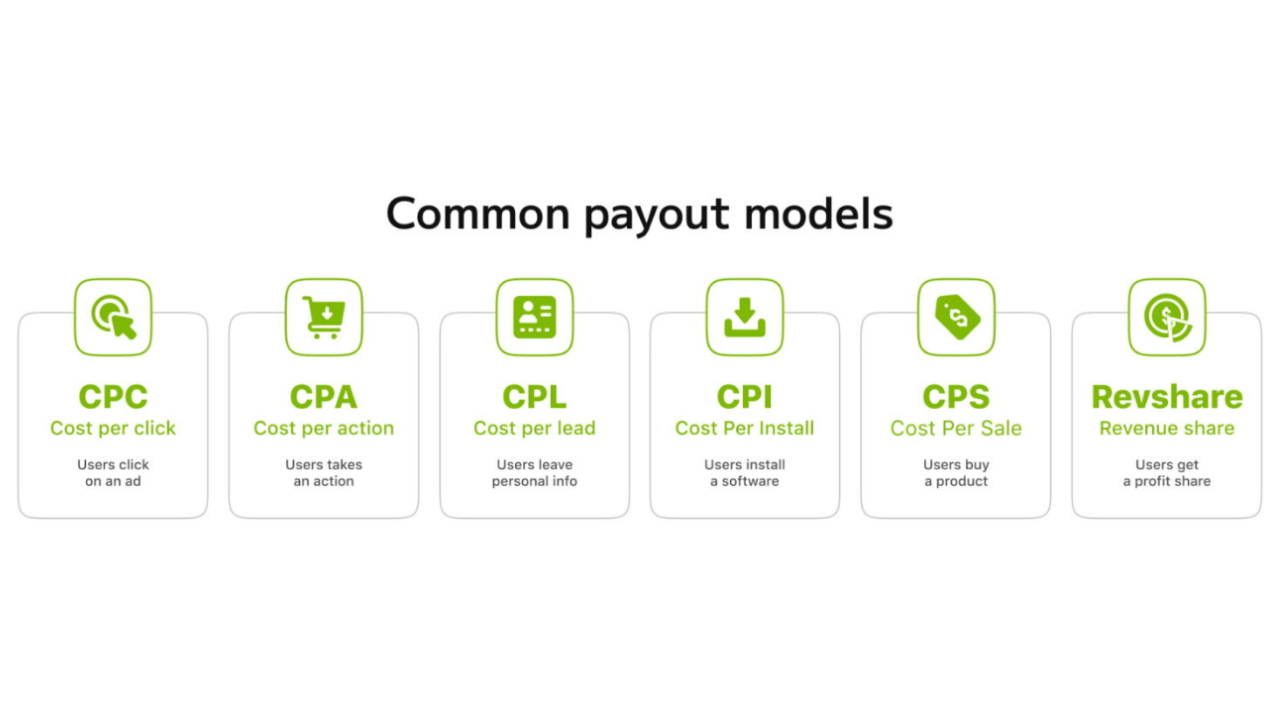
Every affiliate campaign follows a specific payout model, which tells affiliates how and when they’ll earn a commission. Knowing these models helps them choose the right offers based on their traffic type, niche, and promotion method.
- Cost Per Sale (CPS): Affiliates get paid when someone makes a purchase using their affiliate link. This is one of the most common models in eCommerce affiliate marketing. Formula: CPS Earnings = Sale Amount × Commission Rate. If commission is 10% and the sale amount is ₹2,000, earnings = ₹200.
- Cost Per Lead (CPL): Affiliates earn a commission when a user completes a form, signs up for a service, or submits their contact details, without needing to make a purchase. Formula: CPL Earnings = Number of Valid Leads × Payout per Lead. If the payout is ₹50 per lead, and 100 leads are generated, then the earnings = ₹5,000.
- Cost Per Action (CPA): Affiliates get paid when a user completes a specific action, which could be a purchase, sign-up, download, or form fill. It’s a broad category that includes CPS and CPL. Formula: CPA Earnings = Number of Valid Actions × Payout per Action. If payout is ₹100 per action and 40 actions are completed, earnings = ₹4,000.
- Cost Per Install (CPI): Affiliates earn money for every successful app install that happens via their affiliate link. Formula: CPI Earnings = Number of Installs × Payout per Install. If payout is ₹10 per install and 500 installs happen, earnings = ₹5,000.
- Cost Per Click (CPC): Affiliates are paid for every valid click on their link, even if it doesn’t lead to a conversion. This model is usually used in special cases where traffic quality is being tested. Formula: CPC Earnings = Number of Clicks × Payout per Click. If payout is ₹2 per click and 1,000 clicks are generated, earnings = ₹2,000.
- Revenue Share (RevShare): Affiliates earn a percentage of the revenue generated by the user, sometimes recurring with subscriptions. The amount depends on the user’s spending and continues for each billing cycle (if recurring). Example: A subscription brand pays 30% every month a customer stays active.
- Flat Payout: Affiliates receive a fixed commission per valid conversion, regardless of how much the user spends later. This model is common in lead-gen, app installs, and COD sales. Example: ₹100 per verified sign-up, whether the user spends more or not.
Affiliate Tracking and Attribution Terms
Affiliate marketing works only when tracking is accurate. If you’re running content, coupon, or media buying campaigns, it’s important to know how clicks and conversions are tracked, and who gets credit for the sale.
- Tracking Link: A special URL given to the affiliate for each campaign. It contains unique parameters that help the system know which affiliate sent the traffic. When someone clicks your tracking link and buys something, the platform knows you referred them.
- Pixel: A small code placed on the advertiser’s website to track user actions, like clicks, sign-ups, or purchases. It helps record conversions in real time.
- Postback URL (S2S Tracking): A server-to-server (S2S) postback method for tracking conversions. It is considered more secure than pixel tracking because it doesn’t rely on cookies or browser sessions. Instead, conversion data is sent directly from the advertiser’s server to the affiliate network’s server. This makes it especially reliable and widely used in mobile and app-based campaigns.
- Cookie: A small file stored in the user’s browser when they click your affiliate link. It helps remember which affiliate referred them. If someone clicks your link today and purchases three days later, you still get paid if the cookie is valid.
- Cookie Duration: A cookie is a small piece of data stored in a user’s browser when they click on an affiliate link. It contains tracking information such as the affiliate ID and campaign details, allowing the advertiser or network to identify which affiliate referred the user. If the user converts (makes a purchase or takes an action) within the cookie’s active period, the affiliate earns the commission. Common durations are 7 days, 14 days, or 30 days.
- First Click Attribution: Attribution refers to the method of deciding which affiliate (or traffic source) gets credit for a conversion when a user interacts with multiple links or ads. Under the first click attribution model, the credit goes to the first affiliate who brought the user in, even if the user clicked on other affiliate links later before making the purchase.
- Last Click Attribution: In last click attribution, the credit is given to the last affiliate whose link the user clicked before converting.
- Offline Tracking: When conversions happen in-store or through non-digital channels, but still get tracked using phone numbers, QR codes, or connected systems. A user visits a physical store after clicking your link, and the sale is tracked via mobile number.
- Sub ID (SubID Tracking): A custom parameter affiliate can attach to their affiliate link to track extra details about where a click or conversion came from. Affiliates often use Sub IDs to identify which ad, page, keyword, or placement drove the result. Example: You can use Sub ID to see whether your blog or Instagram post performed better.
Traffic Sources and Promotion Channels

How affiliates promote their affiliate links matters as much as what they promote. Different campaigns work better with different traffic sources, and understanding each method helps affiliates choose what fits their strategy.
- Web and M-Web (Mobile Web): Web means desktop traffic from browsers like Chrome or Safari, while M-Web is traffic from mobile browsers. Desktop traffic usually fits research-heavy or high-value niches like finance or software, with users showing higher intent and spending more time comparing before buying. Mobile Web works better for fast-moving niches like fashion, beauty, and food delivery, where people browse on the go, respond quickly to visuals, and prefer easy checkouts. Desktop tends to bring more detailed, quality leads, while mobile brings higher volume but sometimes lower focus.
- Content Marketing: Content marketing means promoting offers through useful content like blogs, listicles, or product reviews. It works best for audiences who research before buying—for example, a blog titled “Top 5 Vitamin C Serums in India” with affiliate links. Such content is discovered by search engines (like Google) through crawlers that scan and index web pages. To get picked up, your content needs the right keywords, the words or phrases people search for, placed naturally in titles, headings, and text. Without relevant keywords, even the best content may not rank well or reach the target audience. A blog titled “Top 5 Vitamin C Serums in India” with affiliate links to each product.
- Coupon and Deal Sites: Affiliates promote offers by sharing promo codes and discounts to attract buyers looking for savings. A promo code is a short combination of letters or numbers (like SAVE20) that shoppers enter at checkout to get discounts, free shipping, or special deals. This method works especially well with price-sensitive audiences who actively search for the best offers before purchasing.
- Cashback Platforms: These are websites or apps where affiliates attract users by offering them a cashback incentive for shopping through their affiliate links. When a user makes a purchase, the affiliate earns a commission and shares a part of it back with the user as cashback. For example, a user may get ₹200 cashback for buying from Swiss Beauty through an affiliate’s tracked link.
- Mobile App Promotion: This refers to promoting affiliate campaigns through mobile applications. Affiliates can use their own apps or partner with third-party apps to place offers, banners, or links. Some brands allow traffic from apps (in-app promotion), while others may restrict it to prevent misuse.
- Email Marketing: Email marketing in affiliate promotion means sending brand offers and affiliate links directly to an email subscriber list. Affiliates can share newsletters, special discounts, or product recommendations to drive clicks and sales. However, proper opt-in practices are essential to avoid spamming users; only people who willingly subscribe should be contacted.
- SMS Marketing: This involves sharing affiliate offers through text messages. SMS has one of the highest open rates among digital channels, which makes it powerful for quick promotions, flash sales, and urgent deals. However, affiliates must target carefully and ensure proper user consent; otherwise, it can be seen as spam.
- Telegram Marketing: Affiliates use the Telegram app to share coupons, deals, and flash sale alerts with a highly engaged audience. Since Telegram allows instant sharing and has a viral element (people forwarding offers to friends), it’s particularly effective for time-sensitive campaigns like festive discounts or limited-period promotions.
- Influencer and Social Media Promotion: Affiliates leverage social media platforms such as Instagram, YouTube, and Facebook to share affiliate links. The strength of this method lies in trust; audiences are more likely to buy if they value the influencer’s recommendation. Whether it’s a YouTube product review, an Instagram reel, or a Facebook post, affiliates can reach large communities with relatable, engaging content that drives conversions.
- Media Buying (Paid Ads): Affiliates spend money to run ads (on Google, Facebook, Instagram, etc.) to drive targeted traffic to their landing pages or directly to the brand. It requires a budget and careful tracking setup to ensure profitability. Paid ads allow affiliates to scale campaigns quickly, but success depends on smart targeting, compliance with brand rules, and optimizing ad spend. For example, an affiliate might run a Facebook ad for a trending wellness brand and redirect traffic through their affiliate link to earn commissions.
Key Terms in Reporting, Validation, & Payments
After affiliates start driving traffic and conversions, the next step is knowing how their performance is measured, how commissions are confirmed, and how payments are made. This section clears up the terms related to reporting, validation timelines, and payouts.
- Affiliate Dashboard: An affiliate dashboard is the interface provided to affiliates by the network. It shows all campaign data in one place, clicks, conversions, earnings, top-performing offers, and traffic breakdowns. Affiliates use it to track performance daily and optimize strategies. For example, an affiliate can log in to their vCommission dashboard to check how many sales they generated for brands like Noise, Foxtale, or Minimalist.
- Validation Period: The number of days brands take to approve or reject a conversion. This ensures there are no cancellations or returns before commissions are confirmed. Common durations are like 30 days, 45 days, or 60 days. This period starts from the date of conversion.
- Approved Conversion: This means a sale or lead has been reviewed and accepted by the advertiser, and the affiliate will get paid for it. A conversion usually gets approved after the advertiser checks that the action was valid and genuine, for example, the order wasn’t cancelled, the payment wasn’t refunded, and the lead wasn’t fake or duplicate. The approval process often happens during the validation period (commonly 7–30 days, depending on the brand and campaign). Once approved, the conversion shows as payable in the affiliate dashboard.
- Rejected Conversion: This means the sale or lead didn’t meet the brand’s rules. Maybe it was cancelled, fake, or broke some policy. The affiliate won’t earn commission for it.
Final Words
Affiliate marketing might seem tricky at first, but once you get familiar with the key terms, everything starts to make sense. If you’re new to the space or already running campaigns, knowing these 50 terms will make it easier to understand how things work, talk to partners clearly, and track your progress with confidence.
You’ll avoid common mistakes like using the wrong traffic sources, missing cookie windows, or getting confused during validation. Instead, you’ll focus on the important stuff, picking the right campaigns, sending quality traffic, and earning commissions for your hard work.
At vCommission, we make sure our affiliates aren’t left guessing. From clear tracking dashboards to timely validation and payments, we support every step of your journey. And if you’re ever unsure about how a term works in a live campaign, our team is here to help, so you can focus on scaling your commissions.
Now that you speak the language of affiliate marketing, you’re ready to turn knowledge into action. Let the earnings begin.


 How Affiliates Can Generate Consistent Revenue with PPC Affiliate Marketing in 2026
 Credit Card and Loan Affiliate Campaigns: Strategies for Higher Conversions
 Semrush Affiliate Program: A High-Payout Offer for Marketers and SEO Publishers
 10 Best Affiliate Marketing Platforms of 2026
 Fintech Affiliate Campaigns: Monetizing Finance Traffic with High-Payout Offers