

 How Affiliates Can Generate Consistent Revenue with PPC Affiliate Marketing in 2026
 Credit Card and Loan Affiliate Campaigns: Strategies for Higher Conversions
 Semrush Affiliate Program: A High-Payout Offer for Marketers and SEO Publishers
 10 Best Affiliate Marketing Platforms of 2026
 Fintech Affiliate Campaigns: Monetizing Finance Traffic with High-Payout Offers
What if Google pulled the plug on your traffic overnight?
That sounds scary, doesn’t it? But for many affiliate marketers, this is becoming a serious problem. Google is no longer playing around with Core Web Vitals, a set of user experience elements that directly affect your search engine rankings. There is no secret to these technical SEO techniques. Your affiliate business could succeed or fail based on these main goals.
Ignoring Core Web Vitals could result in poorer ranks, fewer visitors, and diminishing revenues if you depend on organic traffic and conversions, which you most likely do. Let’s understand what they are, why affiliates care about them now more than ever, and how to maintain your good standing with Google.
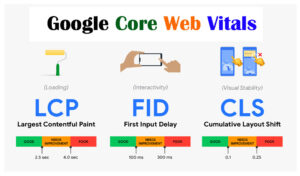
Google’s larger Page Experience update includes Core Web Vitals. They try to understand how well your website functions for actual users under real-world circumstances. These measurements are based on field data gathered from Chrome users, so forget about theoretical load times. Google is aware of any latency or glitches on your website.
There are three main components to Core Web Vitals:
This gauges how quickly your page’s greatest visible content; typically an image or a block of text- loads. Google wants it to take less than 2.5 seconds. Is there anything slower? That is a warning sign.
This calculates the interval of time between a user’s first interaction (clicks, taps, etc.) and the browser’s actual processing of that interaction. FIDs under 100 ms are considered good.
Have you ever clicked on something only to have the page abruptly change, causing you to hit the incorrect link? That is CLS, and it is extremely annoying to both Google and users. To ensure a seamless experience, keep this below 0.1.
These measurements aren’t arbitrary. They are indicators of usefulness and trustworthiness. They are used by Google to determine the ranking of your content. Even great content may go unnoticed if your Core Web Vitals are weak.
Targeted traffic is the one thing that affiliate marketers live on. That hard-earned traffic might be converted into a missed conversion with every second of delay or user annoyance. The stakes are now higher because Google has directly included CWV into its algorithm. How?
Yes, you may launch email blasts and sponsored advertising, but SEO remains the main source of consistent revenue for the majority of affiliates. Core Web Vitals are now taken into account by Google’s algorithm when determining rankings. This implies that the quicker and more seamless website with comparable content wins.
The percentage of visitors that leave your website after only reading one page is known as the bounce rate. It shows how many users aren’t interacting or doing further research.
Missed opportunities are frequently indicated by a high bounce rate.
In short: They came, they saw, they left.
Affiliate landing pages frequently include buttons, pop-ups, advertising, and information. Users will leave before they’ve ever seen your pitch, though, if it means performance is compromised. Low trust + fewer purchases is what a high bounce rate means.
Since the majority of people now surf on mobile devices, the mobile experience comes first.
Higher conversions, reduced bounce rates, and improved engagement are all guaranteed by a quick, responsive design.
Nowadays, the majority of affiliate traffic is mobile. Additionally, slowness, layout changes, and poor UX are considerably more noticeable to mobile users. Google prioritises your mobile version because it is aware of this. You are doomed if your website does not pass CWV on mobile devices.
Drama is not a hallmark of Google. You can tell it’s severe when it begins to literally alert you about Core Web Vitals through Search Console.
There have been noticeable drops in ranks for websites with low LCP, FID, or CLS since 2021. A lot of affiliate marketers report abrupt declines without knowing why, until they look at their performance ratings.
This isn’t conjecture. It’s a methodical change. Google wants the web to be more user-friendly, faster, and cleaner. You will suffer if your affiliate website does not support that goal.

Let’s face it, affiliate websites can quickly become disorganized. Performance is frequently neglected in favour of tracking codes, ad placements, CTA buttons, and third-party pop-ups.
The following are some of the most common errors we find on affiliate websites:
Although they slow down LCP, you may want to display high-resolution product photos or video reviews. One of the most frequent CWV mistakes is not optimising or compressing them.
Popular affiliate themes frequently have a tonne of features, the most of which are unnecessary. Your site will render more slowly the more scripts and CSS files it loads.
Although inexpensive shared hosting can save money, it frequently leads to sluggish server response times. Particularly during traffic spikes, your FID and LCP measurements suffer.
Pop-up tools, ad scripts, and affiliate trackers can impede rendering and create delays. You must control when and how these appear on your page.
Your CLS may suffer from layout jumps brought on by those “flashy” pop-ins or delayed banners. People despise it. Google is even less fond of it.
If you’re not sure how your site is doing, here’s how to find out fast:
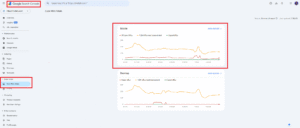
Every month, run these checks. Make the necessary repairs. Give mobile, LCP, and CLS enhancements top priority.
You don’t have to sacrifice creativity or conversions to fix your vitals. You just need to work smarter. Here’s how:
These are low-lift, high-impact steps. Put these into practice, and you’ll see an improvement in conversions and CWV scores.
Meeting Core Web Vitals criteria is more than just checking an SEO box in today’s performance-driven digital market; it’s a clear indication of your brand’s dependability, professionalism, and user-first philosophy. Delivering quick, dependable, and responsive experiences is crucial for affiliate marketers, particularly those working in cutthroat niches, in order to maintain organic visibility, lower bounce rates, and increase conversions. Poor user experience can subtly undermine your entire approach, whether you’re using it to drive users to high-value lead funnels, blog material, or product websites.
Marketers are now in charge of treating technical performance as a fundamental component of their company strategy. This entails carrying out routine assessments, maximising responsiveness on mobile devices, reducing layout changes, and consistently enhancing site speed. Core Web Vitals are now prominently displayed at the top of Google’s ranking system rather than being buried behind the curtain. Setting them as your top priority guarantees that each click you receive will provide genuine value in addition to keeping you algorithm-proof. Performance is not merely a component of the plan; it is the strategy in the realm of affiliate marketing, where every second and pixel matters.
With performance-focused advertising and professional support, vCommission may help you scale your affiliate efforts more quickly. It is the partner your growth strategy needs, from conversion-ready infrastructure to optimised creatives. Make every click matter by starting now.